
 TrueType File Format


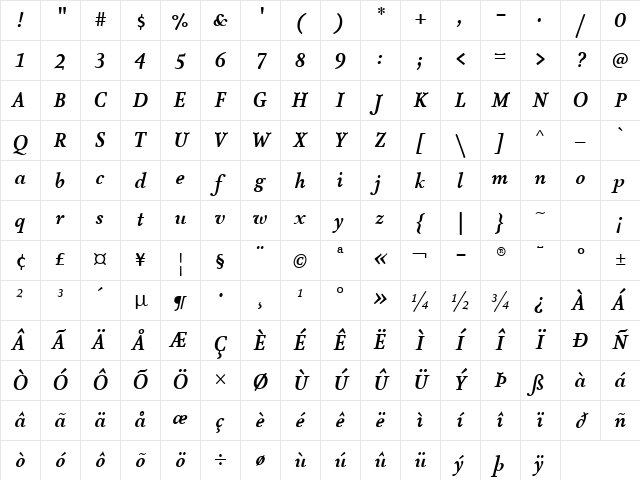
AtmaSerifTF-BoldItalic Regular Character Map
Complete AtmaSerifTF-BoldItalic Regular glyph index. Displaying only characters natively supported by AtmaSerifTF-BoldItalic Regular font.
AtmaSerifTF-BoldItalic Regular Test Drive
Download AtmaSerifTF-BoldItalic Regular
File size: 97.06 KB
File Version: Tue, 10th Jun 2003
File Name: atmaseriftf-bolditalic-regular.ttf
Design Context for AtmaSerifTF-BoldItalic
AtmaSerifTF-BoldItalic carries the refined structure of traditional serif typography, with bracketed terminals and considered proportions that communicate credibility and craft. The slanted form adds forward momentum and visual energy. Its bold stroke weight gives it real presence on the page.
First published in 2003, this typeface is available in TrueType (TTF) format.
A reliable choice for luxury brands, academic publishing, editorial headers, and credibility-focused identities.
Font Pairing: Pairs naturally with a modern sans-serif for UI elements and captions, creating a classic editorial contrast.
Pro Tip: Use AtmaSerifTF-BoldItalic for editorial body copy and considered headline work. Pair with a neutral sans for UI elements or captions to create a classic hierarchy.
Frequently Asked Questions about AtmaSerifTF-BoldItalic Regular
Is AtmaSerifTF-BoldItalic Regular free to download?
Yes, you can download AtmaSerifTF-BoldItalic Regular for free at uFonts. It is available in TrueType format.
How do I install AtmaSerifTF-BoldItalic Regular on my computer?
To install this font, download the file and unzip it if necessary. On Windows: Right-click the font file and select "Install." On Mac: Double-click the file and click "Install Font" in the Font Book preview.
Download Popular Fonts
Most popular fonts right now.









