
 TrueType File Format


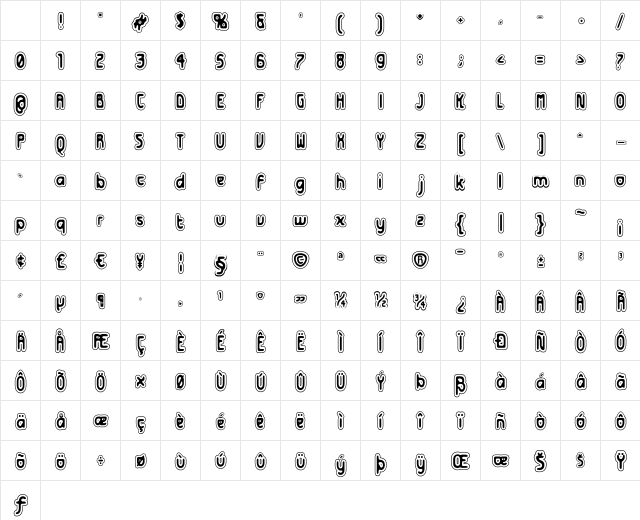
Futurex Distro - Protection Regular Character Map
Complete Futurex Distro - Protection Regular glyph index. Displaying only characters natively supported by Futurex Distro - Protection Regular font.
Futurex Distro - Protection Regular Test Drive
Download Futurex Distro - Protection Regular
File size: 104.45 KB
File Version: Tue, 30th Oct 2001
File Name: futurex-distro-protection-regular.ttf
Design Context for Futurex Distro - Protection
Futurex Distro - Protection has a distinctly futuristic character, with geometric precision and clean angles that feel at home in technology, gaming, and sci-fi contexts.
First published in 2001, this typeface is available in TrueType (TTF) format.
Ideal for esports teams, cyberpunk aesthetics, fintech brands, and anything that needs to feel forward-looking.
Font Pairing: Pairs well with a humanist sans-serif for body copy - the contrast between mechanical precision and organic warmth creates a compelling typographic dynamic.
Pro Tip: Try Futurex Distro - Protection with generous letter-spacing in UI labels and navigation - the geometric forms benefit from room to breathe.
Frequently Asked Questions about Futurex Distro - Protection Regular
Is Futurex Distro - Protection Regular free to download?
Yes, you can download Futurex Distro - Protection Regular for free at uFonts. It is available in TrueType format.
How do I install Futurex Distro - Protection Regular on my computer?
To install this font, download the file and unzip it if necessary. On Windows: Right-click the font file and select "Install." On Mac: Double-click the file and click "Install Font" in the Font Book preview.
Download Popular Fonts
Most popular fonts right now.









