
 TrueType File Format


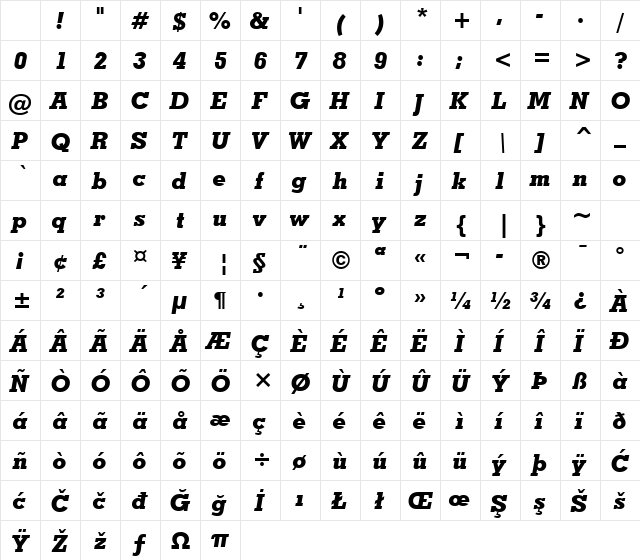
GeoSlab703 XBdIt BT Extra Bold It Character Map
Complete GeoSlab703 XBdIt BT Extra Bold It glyph index. Displaying only characters natively supported by GeoSlab703 XBdIt BT Extra Bold It font.
GeoSlab703 XBdIt BT Extra Bold It Test Drive
Download GeoSlab703 XBdIt BT Extra Bold It
File size: 39.9 KB
File Version: Sat, 5th May 2007
File Name: geoslab703-xbdit-bt-extra-bold-it.ttf
Design Context for GeoSlab703 XBdIt BT
GeoSlab703 XBdIt BT features prominent, blocky serifs that give it a confident, grounded presence - equally at home in editorial settings and bold branding work. Its bold stroke weight gives it real presence on the page.
First published in 2007, this typeface is available in TrueType (TTF) format.
Suited to magazines, political campaign materials, bold packaging, and any setting where authority matters.
Font Pairing: Pairs naturally with a modern sans-serif for UI elements and captions, creating a classic editorial contrast.
Pro Tip: Use GeoSlab703 XBdIt BT for headlines and subheadings where its slab serifs can make an impression. It also holds up well in mid-size body copy thanks to its sturdy construction.
Frequently Asked Questions about GeoSlab703 XBdIt BT Extra Bold It
Is GeoSlab703 XBdIt BT Extra Bold It free to download?
Yes, you can download GeoSlab703 XBdIt BT Extra Bold It for free at uFonts. It is available in TrueType format.
How do I install GeoSlab703 XBdIt BT Extra Bold It on my computer?
To install this font, download the file and unzip it if necessary. On Windows: Right-click the font file and select "Install." On Mac: Double-click the file and click "Install Font" in the Font Book preview.
Download Popular Fonts
Most popular fonts right now.









