
 TrueType File Format


OmegaForce Expanded Italic Expanded Italic Character Map
Complete OmegaForce Expanded Italic Expanded Italic glyph index. Displaying only characters natively supported by OmegaForce Expanded Italic Expanded Italic font.
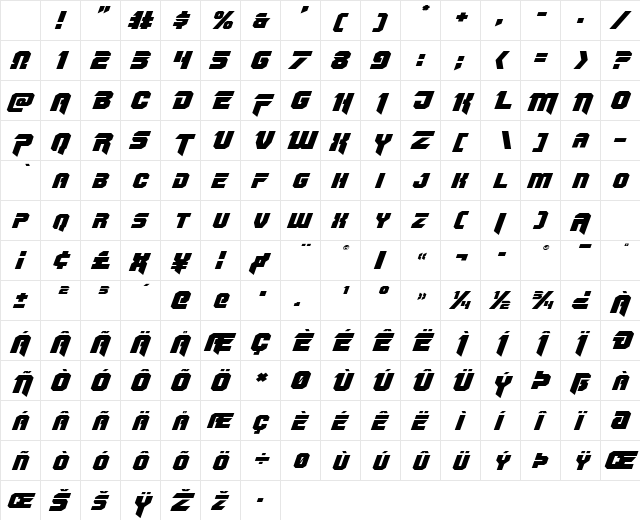
OmegaForce Expanded Italic Expanded Italic Test Drive
Download OmegaForce Expanded Italic Expanded Italic
File size: 19.88 KB
File Name: omegaforce-expanded-italic-expanded-italic.ttf
Design Context for OmegaForce Expanded Italic
OmegaForce Expanded Italic brings high-energy athletic personality to the page - its confident, muscular forms are built for impact. The slanted form adds forward momentum and visual energy.
First published in 2013, this typeface is available in TrueType (TTF) format.
A natural choice for gym brands, fantasy sports, jersey lettering, and action-driven headlines.
Font Pairing: Use alongside a condensed or geometric sans for supporting copy - keep the pairing bold, functional, and free of ornament.
Pro Tip: Use OmegaForce Expanded Italic in all-caps headlines where its athletic energy can fully express itself. Pair with a solid, simple sans for supporting text.
Frequently Asked Questions about OmegaForce Expanded Italic Expanded Italic
Is OmegaForce Expanded Italic Expanded Italic free to download?
Yes, you can download OmegaForce Expanded Italic Expanded Italic for free at uFonts. It is available in TrueType format.
How do I install OmegaForce Expanded Italic Expanded Italic on my computer?
To install this font, download the file and unzip it if necessary. On Windows: Right-click the font file and select "Install." On Mac: Double-click the file and click "Install Font" in the Font Book preview.
Download Popular Fonts
Most popular fonts right now.








