
 TrueType File Format








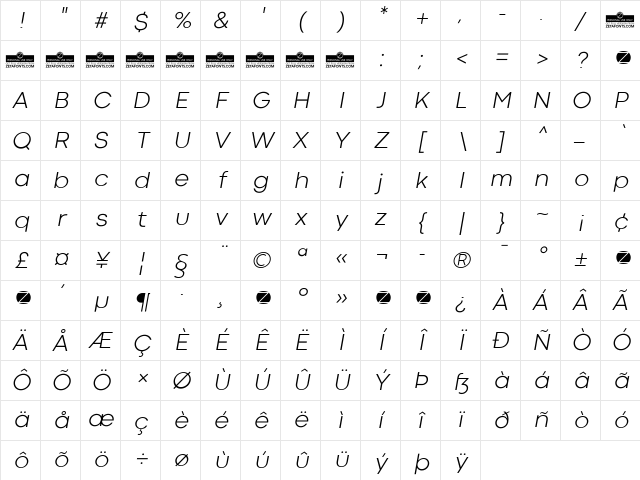
Codec Cold Light Italic Character Map
Complete Codec Cold Light Italic glyph index. Displaying only characters natively supported by Codec Cold Light Italic font.
Codec Cold Light Italic Test Drive
Download Codec Cold Light Italic
File size: 244.39 KB
File Version: Wed, 2nd May 2018
File Name: codec-cold-light-italic.ttf
Design Context for Codec Cold
Codec Cold uses fixed-width spacing throughout, giving it the structured, systematic character associated with coding environments and technical documentation. The slanted form adds forward momentum and visual energy. Its slender proportions lend an understated elegance to any composition.
First published in 2018, this typeface is available in TrueType (TTF) format.
Well-suited to data-driven dashboards, coding tutorials, and any design that wants to reference the world of programming.
Font Pairing: Pairs well with a humanist sans-serif for body copy - the contrast between mechanical precision and organic warmth creates a compelling typographic dynamic.
Pro Tip: Use Codec Cold with slightly increased line-height for extended reading - fixed-width spacing can feel dense in longer passages without extra breathing room.
Frequently Asked Questions about Codec Cold Light Italic
Is Codec Cold Light Italic free to download?
Yes, you can download Codec Cold Light Italic for free at uFonts. It is available in TrueType format.
How do I install Codec Cold Light Italic on my computer?
To install this font, download the file and unzip it if necessary. On Windows: Right-click the font file and select "Install." On Mac: Double-click the file and click "Install Font" in the Font Book preview.
Who designed the Codec Cold Light Italic font?
This font was published by Cosimo Lorenzo Pancini & Francesco Canovaro. Check the technical specs section for copyright and designer details.
Users who downloaded Codec Cold Light Italic also downloaded:









