
 TrueType File Format





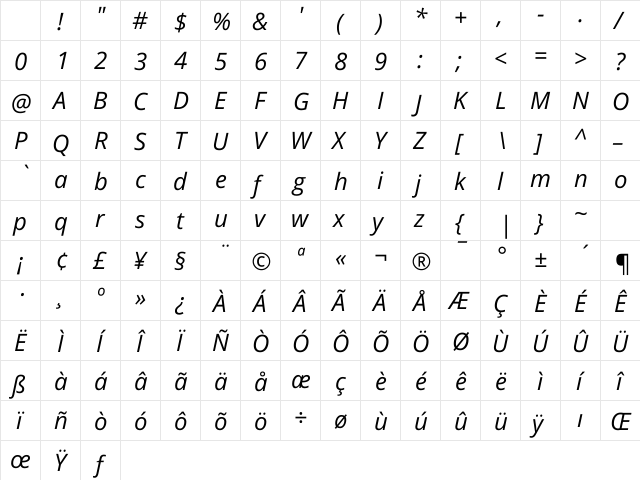
Open Sans Hebrew Italic Character Map
Complete Open Sans Hebrew Italic glyph index. Displaying only characters natively supported by Open Sans Hebrew Italic font.
Open Sans Hebrew Italic Test Drive
Download Open Sans Hebrew Italic
File size: 36.37 KB
File Version: Tue, 27th Jun 2017
File Name: open-sans-hebrew-italic.ttf
Design Context for Open Sans Hebrew
Open Sans Hebrew is a composed and adaptable typeface that performs quietly and consistently across a wide range of design contexts. The slanted form adds forward momentum and visual energy.
First published in 2017, this typeface is available in TrueType (TTF) format.
Suitable for a wide range of creative projects where a clean, neutral typographic foundation is needed.
Font Pairing: Pairs effectively with both display and text companions - its neutral character adapts well to most typographic systems.
Pro Tip: Use Open Sans Hebrew for emphasis, pull quotes, and subheadings where its slanted energy can add rhythm to the layout.
Frequently Asked Questions about Open Sans Hebrew Italic
Is Open Sans Hebrew Italic free to download?
Yes, you can download Open Sans Hebrew Italic for free at uFonts. It is available in TrueType format.
How do I install Open Sans Hebrew Italic on my computer?
To install this font, download the file and unzip it if necessary. On Windows: Right-click the font file and select "Install." On Mac: Double-click the file and click "Install Font" in the Font Book preview.
Who designed the Open Sans Hebrew Italic font?
This font was published by Ascender Corporation, Yanek Iontef. Check the technical specs section for copyright and designer details.
Download Popular Fonts
Most popular fonts right now.









