
 OpenType File Format






















Poetica Supp Swash Capitals IV Character Map
Complete Poetica Supp Swash Capitals IV glyph index. Displaying only characters natively supported by Poetica Supp Swash Capitals IV font.
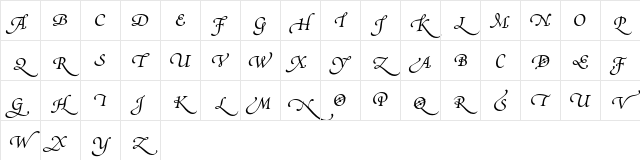
Poetica Supp Swash Capitals IV Test Drive
Download Poetica Supp Swash Capitals IV
File size: 20.9 KB
File Version: Tue, 8th May 2007
File Name: poetica-supp-swash-capitals-iv-opentype.otf
Design Context for Poetica
Poetica flows with the natural rhythm of handwritten lettering, making it ideal for designs that call for warmth and personal expression.
First published in 2007, this typeface is available in OpenType (OTF) format.
Ideal for greeting cards, boutique identities, cosmetics packaging, and handcrafted product branding.
Font Pairing: Combine Poetica with a simple geometric sans for maximum contrast - the tension between flowing curves and clean structure is a classic typographic pairing.
Pro Tip: Use Poetica for short runs of text - names, titles, or taglines. Extended body copy in script faces tires the eye quickly.
Frequently Asked Questions about Poetica Supp Swash Capitals IV
Is Poetica Supp Swash Capitals IV free to download?
Yes, you can download Poetica Supp Swash Capitals IV for free at uFonts. It is available in OpenType format.
How do I install Poetica Supp Swash Capitals IV on my computer?
To install this font, download the file and unzip it if necessary. On Windows: Right-click the font file and select "Install." On Mac: Double-click the file and click "Install Font" in the Font Book preview.
Download Popular Fonts
Most popular fonts right now.









