
 TrueType File Format




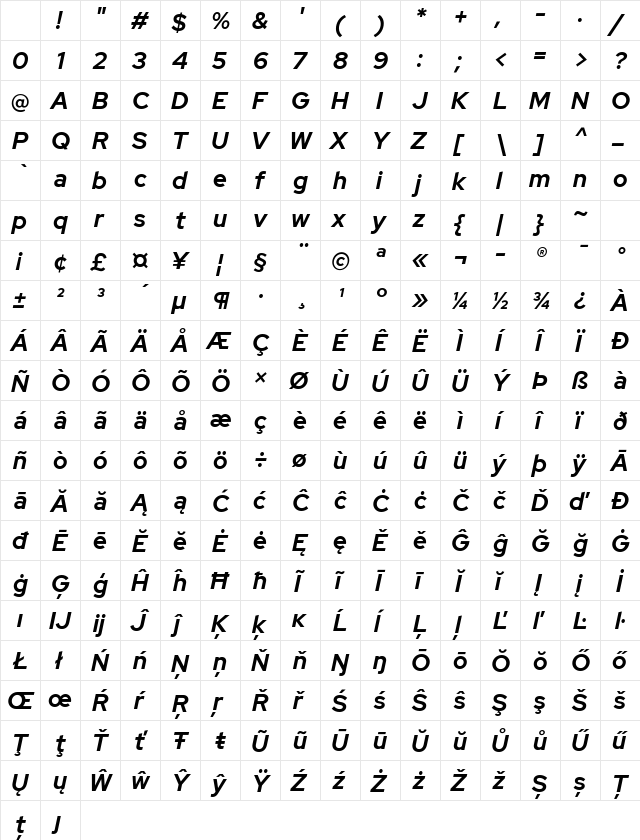
Red Hat Display Bold Italic Character Map
Complete Red Hat Display Bold Italic glyph index. Displaying only characters natively supported by Red Hat Display Bold Italic font.
Red Hat Display Bold Italic Test Drive
Download Red Hat Display Bold Italic
File size: 79.13 KB
File Name: red-hat-display-bold-italic.ttf
Design Context for Red Hat Display
Red Hat Display is built around its visual character rather than neutral utility - its distinctive forms are designed to make an impression at display sizes. The slanted form adds forward momentum and visual energy. Its bold stroke weight gives it real presence on the page.
First published in 2019, this typeface is available in TrueType (TTF) format.
Suited to editorial headers, event branding, and any context where the font itself is part of the message.
Font Pairing: Pair with a clean neutral sans-serif for body copy to let Red Hat Display's character lead without overwhelming the composition.
Pro Tip: Use Red Hat Display exclusively at display sizes - it was designed to be seen, not read at length. Let a neutral companion handle body copy.
Frequently Asked Questions about Red Hat Display Bold Italic
Is Red Hat Display Bold Italic free to download?
Yes, you can download Red Hat Display Bold Italic for free at uFonts. It is available in TrueType format.
How do I install Red Hat Display Bold Italic on my computer?
To install this font, download the file and unzip it if necessary. On Windows: Right-click the font file and select "Install." On Mac: Double-click the file and click "Install Font" in the Font Book preview.
Who designed the Red Hat Display Bold Italic font?
This font was published by Pentagram / MCKL. Check the technical specs section for copyright and designer details.
Download Popular Fonts
Most popular fonts right now.








